ASA real-time logging
ASA real-time logging is a logging feature that
-
displays the last 20 seconds of logged data or the last 10 KB of logged data, whichever limit is reached first
-
temporarily changes the existing logging configuration to request debugging-level data during data retrieval, and
-
returns the logging configuration to its previous state after data collection completes.
Real-time logging operation
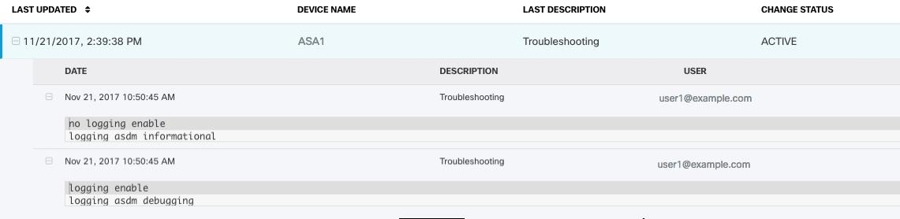
When Security Cloud Control retrieves the real-time data, it reviews the existing logging configuration on your ASDM, changes it to request debugging-level data, and then returns the logging configuration to your configuration. The logging Security Cloud Control displays reflects any logging filters you may have set in ASDM.
You can see the commands that Security Cloud Control sends to perform logging by reviewing the change log. The first entry (on the bottom) indicates that Security Cloud Control "turned on" logging with the logging enable command and changed the ASDM logging level to debugging. The second entry (on the top) shows that the logging configuration was returned to its previous state. Logging was "turned off" with the no logging enable command and the ASDM logging level was returned to informational.